Basics | Applications | Howtos | Plugins
The songs plugin
The lino_xl.lib.songs plugin adds the notions for managing a collection
of songs, optionally including scores generated using Lilypond.
Overview
There is much to say… I don’t know where to start…
Lyrics
https://lilypond.org/doc/v2.23/Documentation/notation/text-markup-commands
Multiple lyric lines
The lyric fields (currently lyrics_soprano for and
lyrics_alto, other voices may come if needed) are
normal plain text field with a special additional rule: if the text starts with
“- “ (a dash followed by a space), then Lino understands it as an array of
multiple lyrics, leading to multiple verses to be aligned with the scores.
Each verse can optionally start with a format specifier, which is a single word with a series of the following characters:
*: use a smaller font for this verse+: put this verse above the scores
Fine-tuning partCombine
The satb.jinja.ly template inserts a partCombine command if two
voices go to a same staff.
This can lead to suboptimal rendering. For example:
scores_tenor:
    \partial 4
    e8 e | b'4. b8 cis cis b b b2.

scores_bass:
  \partial 4
  e8 e | e4. e8 a, a b b e2.
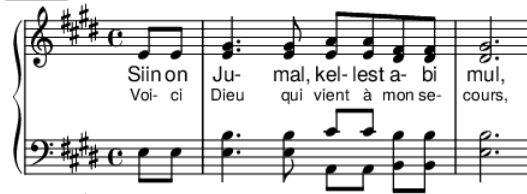
Above output shows that the partCombine command has complex rules. One of them is that voices don’t get (automatically) combined when they are more than an octave apart.
To fix this, insert a partCombineChords before the two cis scores of the
tenor voice. It recommended to switch back to automatic mode afterwards by
inserting a partCombineAutomatic command:
scores_tenor::
  \partial 4
  e8 e | b'4. b8 \partCombineChords cis cis \partCombineAutomatic b b b2.
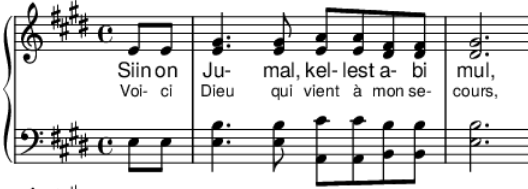
Printing booklets
How to prepare a pdf for printing it as a booklet:
$ sudo apt install texlive-extra-utils
$ pdfxup -b -kbb -nc -im 0pt -is 0pt -fw 0pt -ow -o booklet-a5.pdf publisher.Page-20.pdf
$ open booklet.pdf
NB:
-kbb means “do not compute bounding box, preserve current margins.”
-m 0pt causes a white page after each page (and I don’t understand why)